Geometric Patterns and Digital Paper: A Practical Guide for Designers and Creators
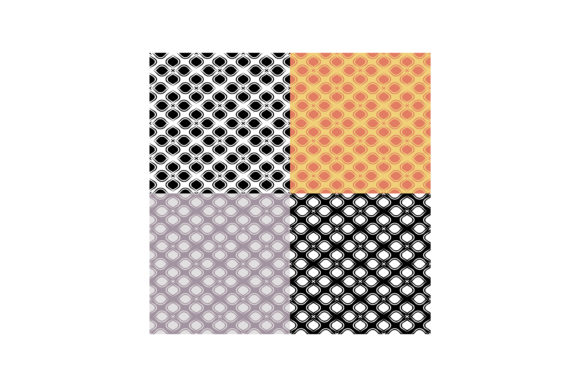
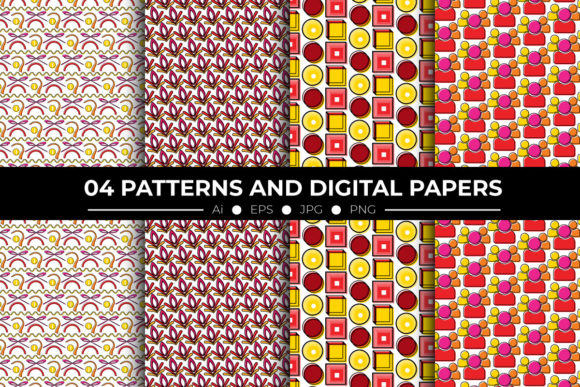
Geometric Patterns and Digital Paper refers to a curated digital asset pack designed for versatility, precision, and professional output. Unlike generic pattern libraries or single-format downloads, this collection delivers a tightly integrated set of resources—four distinct seamless geometric designs—each provided in multiple industry-standard formats and resolutions. Its structure reflects an understanding of real-world design workflows: whether preparing assets for print production, web UI overlays, branding applications, or textile mockups, the files are built to minimize conversion steps and maximize fidelity.
What Sets This Pack Apart from Generic Pattern Resources
Many designers encounter pattern packs that offer only JPEGs or low-resolution PNGs—formats that limit scalability, transparency handling, or editing flexibility. Geometric Patterns and Digital Paper avoids those constraints by including four high-resolution JPGs (3600 × 3600 pixels, 300 DPI), four transparent PNGs at the same resolution, and native vector files in both Adobe Illustrator CC (.ai) and EPS 10 formats. That dual vector support matters: .ai files preserve layers and editable text for users inside the Adobe ecosystem, while EPS 10 ensures compatibility with older software versions and some non-Adobe vector tools.
The inclusion of two “all-in-one” files—one in Illustrator CC and one in EPS 10—adds further utility. These consolidate all four patterns into a single document with clearly labeled artboards, making it easier to preview, compare, or extract individual motifs without toggling between dozens of separate files. For time-sensitive projects or team handoffs, that consolidation reduces friction and supports consistency.
Resolution and Scale: Why 12×12 Inches at 300 DPI Matters
The fixed output size—12×12 inches at 300 DPI—is not arbitrary. It’s calibrated for common physical applications: scrapbook paper, greeting card backgrounds, fabric swatches, packaging liners, and stationery. At that resolution, each pattern tile remains crisp when printed full-size or scaled down to 4×4 inches for business cards or labels. Because the patterns are seamless, they repeat without visible seams or alignment artifacts—even across large-format prints like wall decals or exhibition backdrops.
Compare this with pattern sets offered only as 1000×1000-pixel JPEGs. Those may look adequate on screen but often pixelate or blur when enlarged beyond 4×4 inches at print resolution. Geometric Patterns and Digital Paper sidesteps that issue entirely by anchoring every raster file to a physically meaningful dimension and density.
When Vector Files Make a Real Difference
Vector formats (.ai and .eps) unlock editing capabilities raster files can’t match. With the Illustrator files, you can recolor individual shapes, adjust stroke weights, isolate elements for layering, or integrate motifs directly into logo marks or icon systems. EPS 10 retains similar editability while offering broader software compatibility—useful if you’re collaborating with prepress vendors who rely on legacy RIP software or designers using CorelDRAW or Affinity Designer (with EPS import enabled).
That said, vectors aren’t always necessary. If your use case is strictly web-based—say, applying a subtle background texture to a website header—a high-res PNG or JPG will load faster and render more predictably across browsers. In those instances, the included raster files are sufficient—and having them pre-optimized at 3600×3600 means no upscaling artifacts or manual resampling.
Practical Use Cases and Fit Assessment
Geometric Patterns and Digital Paper suits several specific scenarios well:
- Print-on-demand creators who need scalable, bleed-ready backgrounds for mugs, notebooks, or tote bags—especially where color accuracy and edge-to-edge repetition matter.
- Graphic designers building brand toolkits, where consistent pattern language across business cards, letterhead, and presentation decks requires both visual harmony and technical reliability.
- Digital illustrators adding texture or depth to vector scenes—using the transparent PNGs as overlay layers in Photoshop or Procreate without losing quality.
- Educators or workshop facilitators demonstrating pattern construction, tiling logic, or color theory—where editable vectors allow live deconstruction of symmetry, rotation, or tessellation principles.
It’s less ideal for highly specialized needs: animated SVG patterns, generative design systems requiring parametric control, or ultra-minimalist monochrome line work where texture subtlety outweighs structural clarity. In those cases, custom-built assets or code-driven solutions may provide finer-grained control.
Comparing Format Options: Tradeoffs You Should Know
Each included format serves a purpose—and carries tradeoffs worth acknowledging:
- JPG: Smaller file sizes, universal compatibility, but no transparency. Best for flat-color backgrounds or when embedding into PDFs destined for print.
- PNG: Supports alpha transparency and preserves sharp edges, but larger than JPG. Ideal for web overlays, UI elements, or layered compositing where background color varies.
- .ai: Fully editable in Illustrator—including fonts, gradients, and effects—but requires Adobe software and version compatibility (CC or newer).
- EPS 10: Wider cross-platform support, but lacks modern features like transparency masks or appearance attributes. Still preferred by many commercial printers for reliability.
The fact that all four patterns ship in all four formats—and include consolidated all-in-one files—means users don’t have to choose between convenience and control. You can start with a PNG for quick prototyping, then switch to the .ai file later for client revisions or production refinements.
Realistic Limitations to Consider
No pattern pack is universally optimal. Geometric Patterns and Digital Paper contains exactly four unique designs—thoughtfully composed, but limited in quantity. If your project demands dozens of variations for A/B testing, seasonal rotations, or extensive product line extensions, you’ll likely need to supplement this pack with additional sources—or adapt these motifs manually using the vector files as base templates.
Also, while the patterns are seamless, their geometry is intentionally structured—not organic or irregular. That’s a strength for precision applications, but may feel too rigid for contexts seeking hand-drawn warmth or fluid abstraction. Similarly, the color palettes are balanced and versatile, but not customizable out-of-the-box; recoloring requires vector access or careful raster adjustment.
Making the Right Choice for Your Workflow
Ask yourself three questions before selecting Geometric Patterns and Digital Paper:
- Do I need production-ready files for both screen and print? If yes—and especially if transparency, scalability, or editing flexibility are priorities—this pack delivers measurable advantages over single-format alternatives.
- Is my software environment compatible with .ai or EPS 10? If you primarily use open-source or subscription-free tools without robust EPS support, lean on the high-res PNGs and JPGs, and treat the vectors as optional enhancements.
- How much variety do I actually need? Four strong, cohesive patterns often prove more useful than twenty loosely related ones—particularly when consistency across touchpoints matters more than novelty.
For designers balancing efficiency, fidelity, and adaptability, Geometric Patterns and Digital Paper offers a focused, technically sound solution—not just another decorative download, but a working component in a broader design system.